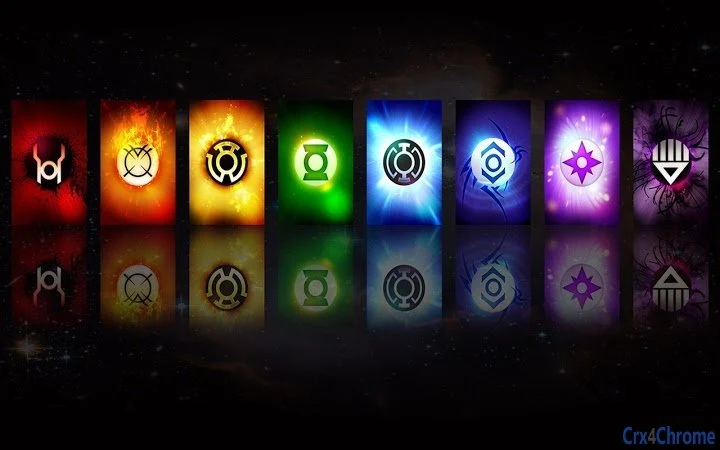

Green Lantern Theme for 1366x768 Displays
Overview
The Green Lantern Corps theme is a desktop wallpaper designed for users who appreciate the iconic visual style of the Green Lantern universe, tailored specifically for standard laptop displays with a resolution of 1366x768. This theme serves as a visual enhancement tool, offering a vibrant and immersive desktop experience for fans of the DC Comics franchise. It is ideal for individuals seeking to personalize their Windows or Mac environments with high-quality, themed imagery without compromising on display compatibility.
Target users include casual desktop users, comic book enthusiasts, and fans of the Green Lantern series who wish to reflect their interests through their device’s appearance. The theme is particularly suited for those using laptops with the common 1366x768 resolution, ensuring full-screen coverage without stretching or distortion. While the developer, Gorzki, has not provided additional details about their background, the theme’s availability through DeviantArt and Twitter indicates a creator engaged with a niche creative community.
Real-world usage scenarios include personalizing a work or study laptop for aesthetic appeal, using the theme as a visual reminder of favorite characters or stories, or sharing the design within fan communities. The theme does not include interactive elements or dynamic features, focusing solely on static visual presentation.
Key Features & Capabilities
- Optimized Resolution – Designed specifically for 1366x768 displays, ensuring perfect fit on most standard Windows and Mac laptops without scaling issues.
- Themed Visual Design – Features imagery and color schemes inspired by the Green Lantern Corps, reflecting the signature green hue and cosmic aesthetic.
- Simple Installation – The wallpaper can be applied directly through system settings, requiring no complex setup or additional software.
- Regular Updates – Version 1.0.1 includes a background color update, indicating ongoing refinement based on user feedback or visual improvements.
- Community Integration – Includes links to the developer’s DeviantArt page and Twitter, enabling users to explore more content and connect with the creator.
Each feature enhances the user’s ability to customize their desktop environment with minimal effort. The optimized resolution ensures that users do not experience pixelation or misalignment, while the thematic design appeals to fans seeking a cohesive visual identity. The update in version 1.0.1 suggests attention to detail in refining the visual experience. Installation is straightforward, relying on native operating system tools, making it accessible to users of all technical levels. Community links foster engagement, allowing fans to discover additional artwork and stay informed about future releases.
User Interface, Workflow & Performance
The software presents a single, static image file that functions as a desktop background. There is no user interface beyond the standard operating system’s wallpaper settings. Users navigate to their display settings, select the image file, and apply it to their desktop. This workflow is simple and efficient, requiring minimal interaction.
As a static wallpaper, the theme imposes negligible performance impact. It does not consume system resources during runtime, nor does it affect CPU or RAM usage. The developer did not specify resource usage details, but based on the nature of the file, it is expected to operate without strain on any modern system. Stability is not an issue, as the file is non-executable and poses no risk to system integrity.
Navigation is limited to the standard OS interface for managing desktop images. No additional menus, panels, or controls are present. The user experience is entirely passive—once applied, the image remains unchanged unless manually replaced. The workflow is consistent across both Windows and Mac platforms, ensuring a uniform experience regardless of the operating system.
Compatibility & System Requirements
The software is compatible with both Windows and Mac operating systems, as specified by the developer. It is designed for devices with a screen resolution of 1366x768, which is widely used across modern laptops. The file size is 2.3 MB, indicating a lightweight download that can be quickly installed on most internet connections.
Exact system requirements were not listed. The developer did not provide information about minimum processor speed, RAM, or graphics capabilities. Compatibility with older systems cannot be confirmed. The theme is not dependent on specific hardware features, as it relies solely on the OS’s ability to display static images.
Installation requires no administrative privileges or third-party software. The file is delivered as a standard image format, likely PNG or JPEG, allowing direct application through native system tools. Users should ensure their device supports the specified resolution to achieve optimal visual results.
Pros and Cons
Pros
- Perfect fit for 1366x768 displays, eliminating stretching or cropping
- Highly themed design appealing to Green Lantern fans
- Free to download and use with no licensing restrictions
- Simple, one-step installation via native OS settings
- Regular updates indicate ongoing developer support
Cons
- No interactive or dynamic elements included
- Not suitable for displays with resolutions other than 1366x768
- Developer details and technical specifications are limited
- Limited functionality beyond visual customization
- Relies on external links for support and additional content
FAQ Section
Is this theme compatible with my laptop?
The theme is optimized for displays with a resolution of 1366x768, which is standard on many Windows and Mac laptops. If your device uses this resolution, the wallpaper will fit perfectly without distortion.
Can I use this theme on multiple devices?
Yes, as long as the devices run Windows or Mac and support the 1366x768 resolution, the theme can be applied across multiple systems.
Is the software safe to download?
Yes, the file is a static image and does not contain executable code. It poses no security risk when downloaded from the official source.
How do I update the theme?
Updates are released through the developer’s DeviantArt page and Twitter. Users can check these platforms for new versions, such as the recent background color adjustment in version 1.0.1.
Do I need to pay for this theme?
No, the theme is completely free to download and use. There are no hidden fees or subscription requirements.
Final Thoughts
This Green Lantern Corps-themed wallpaper offers a clean, visually engaging way to personalize a standard laptop display. Designed with care for the 1366x768 resolution, it ensures a crisp, full-screen experience without technical compromises. While it serves a single, focused purpose—enhancing desktop aesthetics—it does so effectively and efficiently. The free availability, straightforward installation, and developer engagement through social media make it a worthwhile choice for fans of the Green Lantern universe.
Though it lacks advanced features or interactivity, its simplicity is its strength. It delivers exactly what it promises: a high-quality, themed background tailored to modern standard displays. For users seeking a quick, safe, and visually satisfying desktop refresh, this theme is an excellent option.
Download Green Lantern Theme for 1366x768 Displays now.







